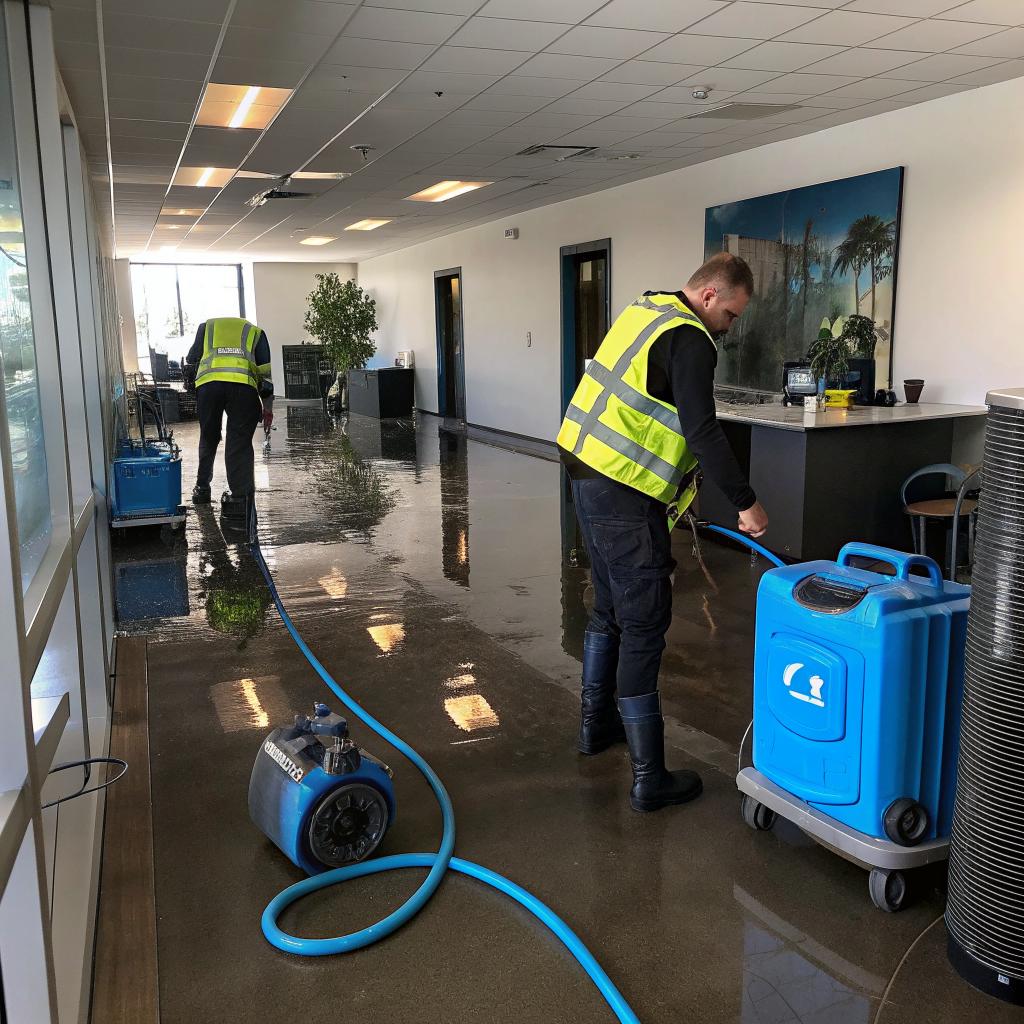

Most people think the biggest threat to their tech office is a server crash or a bad deploy, but water on the floor can take you down much faster than a bad commit.
If you run a tech office in Salt Lake City and a pipe bursts, a sprinkler misfires, or snowmelt floods the basement, the short answer is simple: shut off the water and power if you can do it safely, move high-value hardware off the floor, start basic containment with towels and plastic, then call a professional service for emergency water removal Salt Lake City within the first hour. The faster that truck shows up with extraction pumps and drying equipment, the higher your chances of keeping racks dry, avoiding mold in your walls, and getting your people and your services back online with minimal downtime. Visit All Pro Services for more information.
That is the blunt version. Now let me walk through the less tidy, more realistic path of what actually happens in a tech space when water shows up where it should not.
Why water damage hits tech offices harder than regular offices
There is a quiet myth that “we are in the cloud, so the office is not that critical.” That sounds nice during planning sessions, until you have an inch of water under your dev team’s desks and your core switch is on the floor behind the office printer.
Tech offices usually have:
- More electronics close to the ground
- Denser cabling and power strips in small spaces
- Ad hoc server corners or lab benches that never made it into the official floor plan
- People who can work remotely, but only if the network edge and VPN hardware stay online
This mix makes water incidents a bit more tricky. A law office with wet carpet has a bad day. A web hosting or SaaS office with wet network closets might lose monitoring, VPN, staging environments, or physical build servers.
You might tell yourself everything is in a colocation facility or a public cloud region, which is often true for production. But local assets still matter:
Your office might not host production, but it probably hosts key hardware that makes your team productive and keeps you compliant.
Think about what lives in your space right now:
– UPS units
– Network switches and firewalls
– Wi-Fi controllers
– Local backup appliances
– NAS boxes with internal logs, archives, or development assets
Water does not care about your infrastructure diagram. It goes wherever gravity tells it to go, often toward the lowest and most forgotten spots, which are usually where we hide cables and power strips.
Common water scenarios in Salt Lake City tech offices
Salt Lake City brings its own set of water risks for office buildings:
- Frozen pipes that burst during cold snaps
- Roof leaks after heavy snow or rain
- Sprinkler discharges from minor incidents or faulty sensors
- Groundwater seepage into basements during rapid snowmelt
- Old plumbing in older downtown buildings that no one has updated
In practice, the three that hit tech offices the most are broken pipes, malfunctioning sprinklers, and slow roof leaks that finally reach a ceiling tile right over your network area.
The strange thing is that many teams plan disaster recovery for regional cloud outages, but not for the moment ceiling tiles start sagging over the help desk.
What to do in the first 15 minutes
Those first minutes set the tone. You cannot do full restoration work yourself, but what you do before professionals arrive can reduce both downtime and damage.
Here is a simple, realistic order of actions. It will not be perfect in real life, and that is fine.
1. Protect people first
If water is near outlets, power strips, server racks, or any exposed wiring, assume there is a shock risk. Do not be a hero with a mop in one hand and a live power strip floating nearby.
If you see water touching live equipment and you are not qualified to handle electrical systems, evacuate that area and call building management or an electrician before stepping in.
Have everyone move away from the affected zone. You can keep some of the team working in dry parts of the office or remotely, but make sure no one is walking through water near electrics.
2. Kill the source and, if safe, the power
If the source is obvious, like a broken pipe or a tripped sprinkler head, find the nearest shutoff valve. Many offices do not label valves clearly, which is frustrating, but you might see:
– A main building shutoff near mechanical rooms
– A floor-level shutoff near restrooms or kitchen areas
– Sprinkler zones with control valves in a hallway or closet
Again, do not walk through water if you suspect live electricity.
After shutting off the water, look at power. You want to:
– Power down affected circuits if possible without plunging the entire company into darkness
– Shut down noncritical hardware near water sources
If you have a single breaker that covers a flooded quadrant of the office, flipping it can be safer than trying to unplug individual devices.
3. Move the right hardware, not everything
Many people panic and start moving every monitor and keyboard they can reach, while the real value sits under a desk in a small 2U box.
Focus on:
– Network gear on or near the floor
– UPS units
– Any desktop towers used for builds, render nodes, or unique tasks
– External drives, NAS units, backup appliances
– Test benches with small form factor systems or boards
You do not need to fully cable manage during this. Just get hardware to a higher and dry location. A simple trick is to use office tables as emergency racks. Lay equipment flat, on dry surfaces, away from windows and from any place that might start dripping.
If the water is actively flowing in, make fast choices. You will not save everything. Save what would hurt your business the most to replace.
4. Start basic containment
You are not doing professional remediation, but a bit of quick work can stop water from spreading into areas where you still want people working.
Basic steps:
– Place trash bins or plastic tubs under active drips
– Use towels or absorbent socks to create barriers at doorways
– Move cables and power strips off the floor, even if it means hooking them temporarily along walls or desks
– If you have plastic sheeting from some random office project, use it to cover gear that you cannot move
Anything you do to keep water out of network closets, server corners, or storage rooms buys you more time to stay operational or at least restart faster.
At this point, you have done what a person on site can reasonably do. Now you need the professionals.
Why professional emergency water removal matters for tech-heavy spaces
You can rent shop vacs, bring in box fans, and open windows. That might work for a small spill near the kitchen. Once you have more than a few square feet of soaked carpet or standing water, you are dealing with hidden damage.
Tech offices often sit on raised floors, have data cabling under carpets, and hide power paths behind thin walls. Moisture loves these spots.
Professional crews bring:
- High volume extraction equipment for standing water
- Commercial dehumidifiers that pull moisture out of walls and subfloors
- Moisture meters to check behind drywall and under flooring
- Knowledge of where water travels in commercial buildings
There is also the mold angle. Mold is not just a health issue. It can cause long office closures, insurance disputes, and long-term occupancy issues if your landlord has to open up large sections of the building later.
If your office is full of people with allergies, or you run a 24/7 support center, the last thing you want is a future mold remediation project that forces everyone out again.
The hidden impact on uptime and digital communities
For a website focused on web hosting, digital communities, and tech, the connection is pretty clear. People expect you to be online. They also expect your support, your incident response, and your communication channels to work even when your office has problems.
A water event in your office can:
– Knock out local monitoring and alerting that are not fully cloud hosted
– Take down VPN access if your primary concentrator is local
– Interrupt on-call schedules if laptops and phones are in a wet workspace
– Halt development if key build or test hardware is on site
Many tech leaders assume “we will just work from home” as a fallback. That is not always quick. Some staff leave chargers, tokens, or hardware keys in the office. Some services are bound to IP addresses that expect routing from your office edge.
You do not want to learn all of this on a wet Tuesday morning.
Practical response checklist for tech offices
At some point you need a clear checklist you can copy into your internal wiki or disaster playbook. This does not cover every possible detail, but it gives structure during chaos.
Before the incident: simple prep that pays off
Preparation often sounds boring, but minor setup work really does reduce damage. You do not need a big budget for most of this.
- Mount network gear and power strips off the floor, at least a few inches up
- Store backup drives and NAS units on shelves, not on the ground
- Label shutoff valves and electrical panels, with photos in your internal docs
- Keep low-cost plastic sheeting and painter tape in a known closet
- Document what hardware is in which room, with priority tags
- Record vendor contact info for emergency water removal and building management
It feels almost trivial until you need that valve diagram or the phone number of your restoration vendor at 3 a.m.
During the incident: roles for tech teams
Your office manager or building manager will usually coordinate with the remediation crew. Tech teams still have clear jobs.
| Role | Main focus during water incident |
|---|---|
| IT / DevOps lead | Protect network gear, VPN, and backup devices. Decide what powers down and what stays online. |
| Engineering manager | Move staff to remote work. Reassign priorities. Communicate changes to other teams. |
| Office / facilities contact | Coordinate with building, remediation vendor, and insurance. |
| Communications / support lead | Update status pages, customer channels, and community spaces if any service impact occurs. |
You do not need this to be perfect. Even a light assignment like this avoids that awkward moment where everyone stands around asking “Who calls the landlord?”
After the water is removed: tech-specific recovery
Once the trucks leave and dehumidifiers hum in the background, the work is not over for tech people.
Key tasks:
- Inspect all power strips, extension cords, and low outlets in affected areas
- Check racks and wall mounts for moisture and rust
- Re-test UPS units under load, since they can be sensitive to humidity
- Verify that no moisture seeped into underfloor cable trays or conduits
- Document hardware that was near water even if it seems fine today
Humidity spikes can shorten component life. A switch that “survived” a water event might fail months later. Having a log helps you argue for replacement if it starts misbehaving.
How water incidents connect to your hosting and digital presence
This might still feel like an office management problem. Let me tie it more directly to the kind of readers who care about web hosting and online communities.
Incident communication when your office is under stress
If you run:
– A small hosting shop with on-prem gear
– A SaaS app with a support team in Salt Lake City
– A digital community with moderation staff in one office
then a water issue in the building can ripple out to your users.
You might have production still running fine in a data center or in the cloud, while your:
– Support response times slow down
– Manual moderation reviews are delayed
– On-call team is juggling personal safety, hardware moves, and tickets
Honest communication helps. Explain that you have a facility incident that affects staff access and some on-site systems, but that your production systems remain safe. People do not need long drama stories, but a short, plain status update makes a big difference.
Rethinking what must live in the office
Water damage also raises a more strategic question: what hardware should still live in the office at all?
Some examples of things that are often kept on site, but maybe should not be:
- Primary monitoring servers that watch production
- Single VPN appliances with no cloud-based backup
- Only copy of certain internal tools on one physical box
- Authentication hardware that all remote work depends on
I am not saying you must move everything out. That is not always realistic. But water risk is one more reason to:
– Use cloud-based monitoring as a backup
– Keep at least one VPN endpoint outside the office
– Mirror critical internal tools to remote locations or cloud
Many teams move to remote or hybrid work for culture reasons. Floods and leaks add a very practical reason.
Working with building management and insurance
No one really prepares you for the bureaucracy part. Yet for a lot of tech offices, this is where time disappears.
Coordination with landlords
In Salt Lake City, many tech tenants are in mixed-use buildings or older downtown towers. That means your landlord controls:
– Main water shutoffs
– Fire systems and sprinklers
– Roof maintenance
– Many of the vendors that touch the structure
So you may do everything right inside your suite, but still rely on them for final repairs.
Keep clear records:
- Take timestamped photos and short videos of all affected areas
- Log which rooms had standing water and for how long
- Note what hardware you had to move or power down
- Keep invoices and written findings from the water removal company
This proof helps if you need the landlord to replace carpet, repair walls, or support mold-related work later.
Insurance and tech gear
Tech hardware in offices can be slightly tricky for insurance. The carrier cares about:
– Purchase value
– Age of equipment
– Whether damage was sudden or long-term
– Whether it was stored and protected in a “reasonable” way
It is not rare for them to question coverage if high-value gear was directly on the floor, sitting in a known leak area, or near an unprotected window.
From a practical point of view, having:
– Serial numbers
– Purchase records
– Asset tags tied to inventory systems
makes this much easier.
And from a realistic point of view, this is one area where tech companies should be picky with their policies. A lot of generic business policies are not written with racks, NAS units, or delicate lab hardware in mind.
Technical risks: moisture, wiring, and gear health
If you are the person in your office who thinks about hardware longevity, servers, and cables, here is the part you probably care about the most.
Corrosion and invisible damage
Water damage is not always about short circuits the same day. Lingering moisture can sit inside connectors, under chips, and in cable jackets.
Potential long-term problems:
- Intermittent network issues due to corroded connectors
- Unexpected UPS alarm behavior
- Higher rates of fan failure and power supply issues
- Strange, infrequent reboots on devices that were near the affected area
If you have budget, replacing any device that was heavily exposed is safer than hoping it behaves. If you do not, at least mark them internally so you remember their history.
Raised floors and hidden cable runs
Some tech offices in Salt Lake use raised flooring or under-carpet channels for data and power.
If water got through to those:
– Have professionals open sample sections to check for moisture
– Use moisture meters in a grid pattern along the affected path
– Dry thoroughly before sealing anything back up
Water sitting in an underfloor channel can create a humidity pocket that slowly degrades cables and also encourages mold.
Choosing what to power on again
When things look dry, there is a strong urge to just plug everything back in. Slow down here.
Reasonable approach:
- Visually inspect power cables, connectors, and device shells.
- Check for swelling, discoloration, or residue.
- Start with low-value gear, test outlet safety, then move to network and higher-value devices.
- Watch logs and console events for the first hours after power-on.
If you are unsure about a power strip or surge protector, replace it. They are cheap compared to any connected hardware.
Power strips and UPS units that have been in contact with water or heavy moisture should be treated with extra caution, even if they appear fine at a quick glance.
Making emergency water response part of your tech runbook
You probably already have some runbooks for outages, data loss, or cloud incidents. Water might feel like a facilities issue, but in practice it intersects right with tech operations.
What to include in your runbook
Keep it simple. One short page printed and also in your internal wiki is enough.
Key sections:
- Who to contact first (building, emergency water removal vendor, internal leads)
- Where main shutoffs and breakers are, with photos or diagrams
- Priority list of hardware to protect or move
- Decision tree for office closure vs remote work switch
- Checklist for bringing systems back online after the area is dry
The point is not to script every move. You just want a calm list that people can follow when the room is noisy and the floor is wet.
Dry runs and small tests
Some teams run fire drills and evacuation drills. Very few run “what if there is water in the network room” drills. You do not need a big exercise, but you can:
– Walk through the route from the network room to the nearest exit carrying a heavy device
– Time how long it takes to locate valves and panels
– Simulate the decision to switch everyone to remote work mid-day
These small tests reveal things like blocked storage rooms, unlabeled panels, or confusion about who calls which vendor.
Why tech leaders should care personally
If you are in charge of engineering, IT, or operations, you are probably tired of new “things to worry about.” This one sounds like facilities, so it is tempting to hand it off.
I do not think that is always a good idea.
Water events directly affect:
– Your service reliability, if any on-site gear is involved
– Developer productivity, especially for hardware-heavy teams
– Morale, if staff feel that basic physical risks are being ignored
Also, people often look to tech leadership in any emergency, even if it is not a “tech” problem, simply because they are used to seeing you solve unexpected issues.
Taking the time to:
– Walk the office with facilities
– Move racks off the floor where possible
– Make sure the runbook and vendor list exist
is not glamorous work, but it is real risk reduction.
Sometimes what protects uptime is not a clever failover script. It is a slightly dull choice to store your only VPN appliance three feet above the floor.
Questions teams usually ask after their first water incident
Q: How fast do we really need to call an emergency water removal service?
A: For tech-heavy spaces, within the first hour is ideal. Carpet and subfloor can start holding moisture very quickly, and ceiling water often spreads in ways you cannot see. The faster extraction and drying begin, the better your chances of saving walls, flooring, and sometimes even avoiding more hardware losses. Waiting “to see if it dries” often leads to mold, hidden damage, and longer downtime later.
Q: Can we just rely on remote work and ignore the office for a while?
A: You can shift to remote for a period, and in some cases that is the right move. But leaving a wet office unattended is risky. Moisture trapped in walls and floors does not just affect the structure. It also threatens wiring, outlets, and any gear still in the building. Remote work can keep business going, but it does not fix the building. You still need proper drying and assessment.
Q: Do we need a different office if we have had one major water incident?
A: Not always. One incident can be a freak event, like a single pipe failure or a specific roof issue that gets repaired correctly. What matters is how the landlord and vendors respond. If problems repeat or if the building is slow to address root causes, then yes, you should start thinking about whether this space matches the needs of a tech-heavy team. But one event, handled well, is usually something you can learn from and plan around next time.